> For the complete documentation index, see [llms.txt](https://kb.pvhostvm.ru/llms.txt). Markdown versions of documentation pages are available by appending `.md` to page URLs; this page is available as [Markdown](https://kb.pvhostvm.ru/hostvm-vdi/hostvm-vdi-admin-guide/mfa/totp.md).

# TOTP

TOTP - метод двухфакторной аутентификации, при котором верификационный код генерируется в приложении (FreeOTP, GoogleAuthenticator и т.п.) на основе секретного ключа и текущего времени.

Функции:

* Верификация пользователя;
* Динамические коды (недействительны после истечения времени);
* Офлайн-работа (не требует подключение к сети интернет или sms-аутентификации).

## Создание TOTP МФА <a href="#creating-totp" id="creating-totp"></a>

Для создания МФА TOTP перейдите в раздел "Аутентификация" > "МФА", нажмите "Новый" и выберите тип "TOTP МФА".

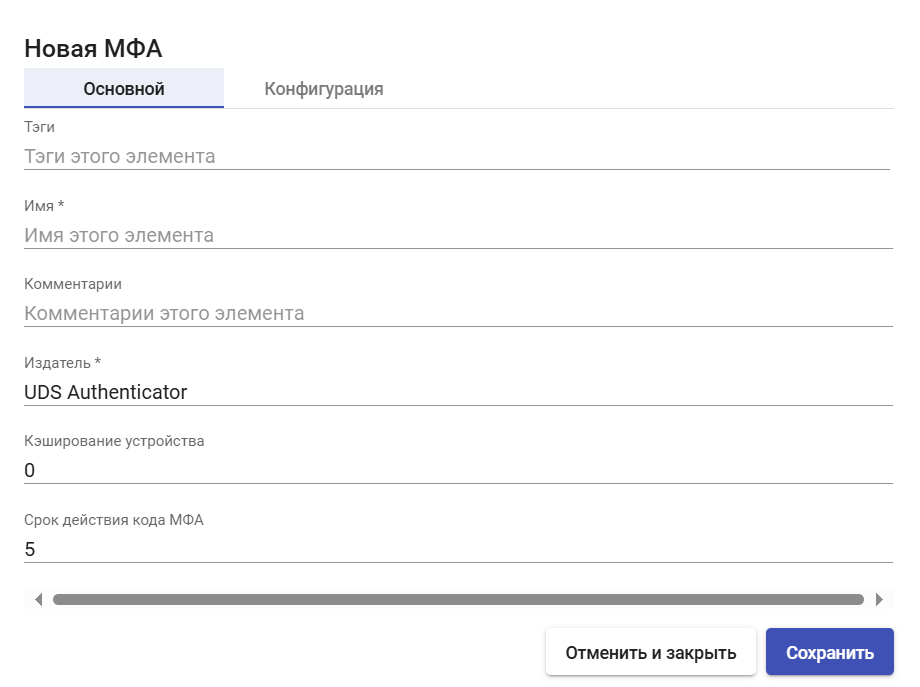
## Основные настройки <a href="#main" id="main"></a>

<figure><img src="https://raw.githubusercontent.com/hostco-ru/hostvm/master/.gitbook/assets/TOTPMFA2.png" alt=""><figcaption></figcaption></figure>

**Имя** - наименование создаваемого МФА для отображения в системе.

**Издатель** - издатель OTP. После создания МФА данный параметр изменить нельзя.

**Кэширование устройства** - время кэширования устройства (в часах), в течение которого МФА повторно не требуется. Привязывается к пользователю.

**Срок действия кода МФА** - время в минутах, в течение которого можно использовать код МФА.

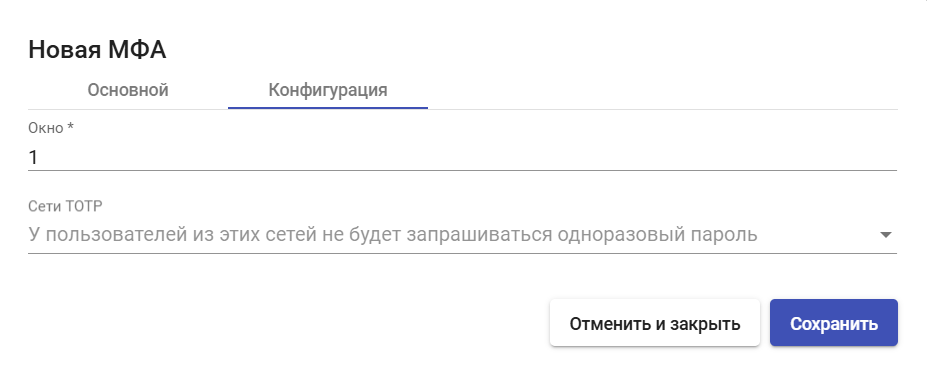
## Конфигурация <a href="#config" id="config"></a>

<figure><img src="https://raw.githubusercontent.com/hostco-ru/hostvm/master/.gitbook/assets/TOTPMFA3.png" alt=""><figcaption></figcaption></figure>

**Окно** - количество действительных кодов до и после текущего.

**Сети TOTP** - у пользователей из этих сетей не будет запрашиваться одноразовый пароль.

После внесения необходимых настроек нажмите **"Сохранить"**.

---

# Agent Instructions
This documentation is published with GitBook. GitBook is the documentation platform designed so that both humans and AI agents can read, navigate, and reason over technical content effectively. Learn more at gitbook.com.

## Querying This Documentation
If you need additional information that is not directly available in this page, you can query the documentation dynamically by asking a question.

Perform an HTTP GET request on the current page URL with the `ask` query parameter, and the optional `goal` query parameter:

```
GET https://kb.pvhostvm.ru/hostvm-vdi/hostvm-vdi-admin-guide/mfa/totp.md?ask=<question>&goal=<endgoal>
```

`ask` is the immediate question: it should be specific, self-contained, and written in natural language.
`goal` is optional and describes the broader end goal you are ultimately trying to accomplish on behalf of the user. GitBook uses it to tailor the answer towards what is most useful for that goal.

The response will contain a direct answer to the question and relevant excerpts and sources from the documentation.

Use this mechanism when the answer is not explicitly present in the current page, you need clarification or additional context, or you want to retrieve related documentation sections.