> For the complete documentation index, see [llms.txt](https://kb.pvhostvm.ru/llms.txt). Markdown versions of documentation pages are available by appending `.md` to page URLs; this page is available as [Markdown](https://kb.pvhostvm.ru/hostvm-vdi/hostvm-vdi-admin-guide/mfa/radius.md).
# Radius
МФА Radius - метод двухфакторной аутентификации, при котором пользователь получит верификационный код от сервера Radius.
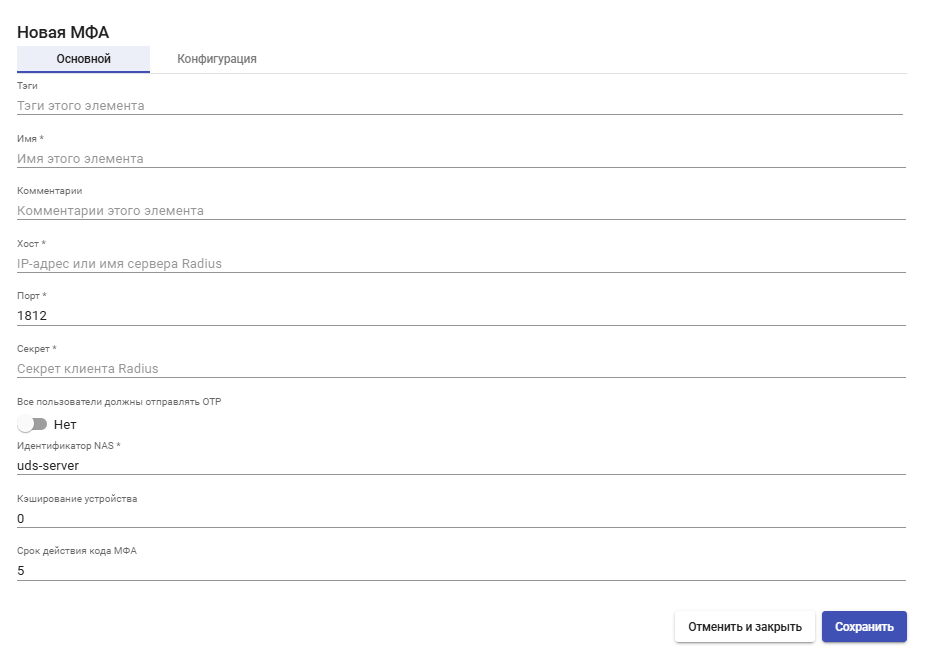
Для создания МФА Radius перейдите в раздел "Аутентификация" > "МФА", нажмите "Новый" и выберите тип "Radius OTP".
## Основные настройки
**Имя** - наименование создаваемого МФА для отображения в системе.
**Хост** - IP-адрес или FQDN сервера Radius.
**Порт** - порт аутентификации Radius (по умолчанию 1812).
**Секрет** - секретный пароль клиента Radius, который используется для аутентификации.
**Все пользователи должны отправлять OTP** - если отключено, добавляется этап проверки необходимости OTP для конкретного пользователя.
**Идентификатор NAS** - идентификатор NAS для Radius Server.
**Кэширование устройства** - время кэширования устройства (в часах), в течение которого МФА повторно не требуется. Привязывается к пользователю.
**Срок действия МФА** - время в минутах, в течение которого можно использовать код МФА.
## Конфигурация
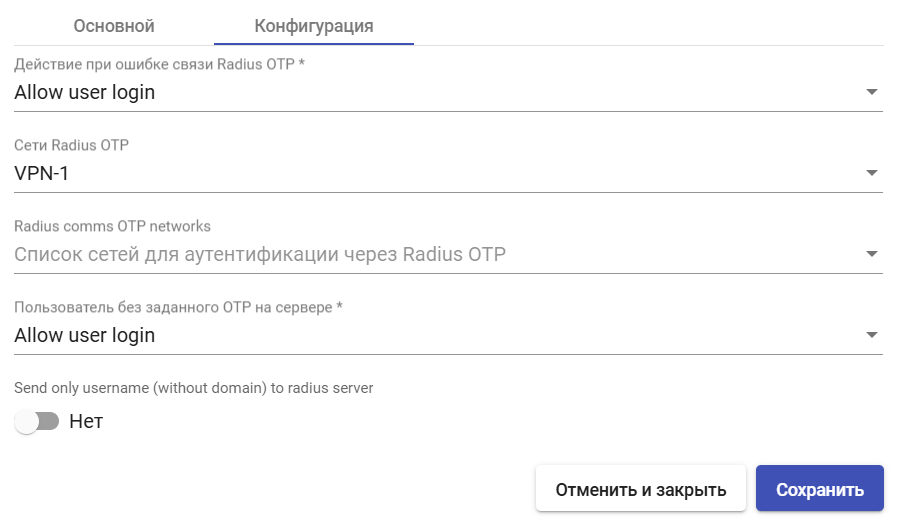
**Действия при ошибке связи Radius OTP**:
* **Allow user login** - разрешить доступ пользователю;
* **Deny user login** - отказать в доступе пользователю;
* **Allow user to login if their IP is in the network list** - разрешить доступ пользователей, если их IP есть в списке сетей;
* **Deny user to login if their IP is in the network list** - запретить доступ пользователей, если их IP есть в списке сетей.
**Radius comms OTP networks** - список сетей для аутентификации через Radius OTP.
**Сети Radius OTP** - у пользователей из данных сетей не будет запрашиваться одноразовый пароль.
**Действия для пользователя без заданного OTP на сервере**:
* **Allow user login** - разрешить доступ пользователю;
* **Deny user login** - отказать в доступе пользователю;
* **Allow user to login if their IP is in the network list** - разрешить доступ пользователей, если их IP есть в списке сетей;
* **Deny user to login if their IP is in the network list** - запретить доступ пользователей, если их IP есть в списке сетей.
**Send only username (without domain) to radius server** - если включено, доменная часть в имени пользователя будет удалена перед отправкой Radius серверу.
После внесения необходимых настроек нажмите **"Сохранить"**.