> For the complete documentation index, see [llms.txt](https://kb.pvhostvm.ru/llms.txt). Markdown versions of documentation pages are available by appending `.md` to page URLs; this page is available as [Markdown](https://kb.pvhostvm.ru/hostvm-vdi/hostvm-vdi-admin-guide/base-image-preparation/astra-linux-clones-join-domain.md).
# Ввод тонких клонов в домен для Astra Linux
**Все действия выполняются в ОС золотого образа.**
Создать файл скрипта postinstall.sh с содержанием:
```bash
sudo astra-ad-sssd-client -d 'нужный_домен' -u 'логин_доменной_уч' -p 'пароль_доменной_уч' -y; sudo rm -f /путь/postinstall.sh; sudo reboot
```
Добавить разрешение на запуск созданному файлу, например:
```bash
sudo chmod +x /home/astra/postinstall.sh
```
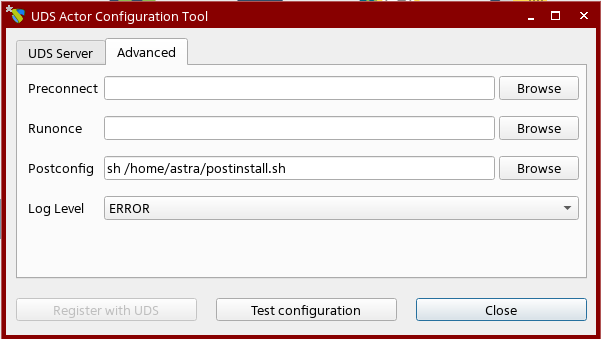
В Actor Configuration Tool на вкладке Advanced указать:
```bash
sh /путь/postinstall.sh
```
Например:
Применить новую конфигурацию нажав **Register with UDS**.
Выполнить публикацию на брокере.